Modèle BioRender

Quick Guide: Edit and Animate in PowerPoint

BioRender circle logo
Créé par 
Sally Kim
  •  
BioRender Team
Utiliser ce modèle – Gratuit
Aucune carte de crédit requise pour l'inscription.

Ce modèle est entièrement modifiable dans BioRender

  • Remplacez le texte, les formes et les icônes
  • Changez les couleurs et réorganisez chaque icône, ligne et étiquette
  • Exportez ou partagez pour tout type d'utilisation

Scientist Avatars

Rejoignez plus de 4 millions de scientifiques qui créent déjà des figures prêtes pour la publication

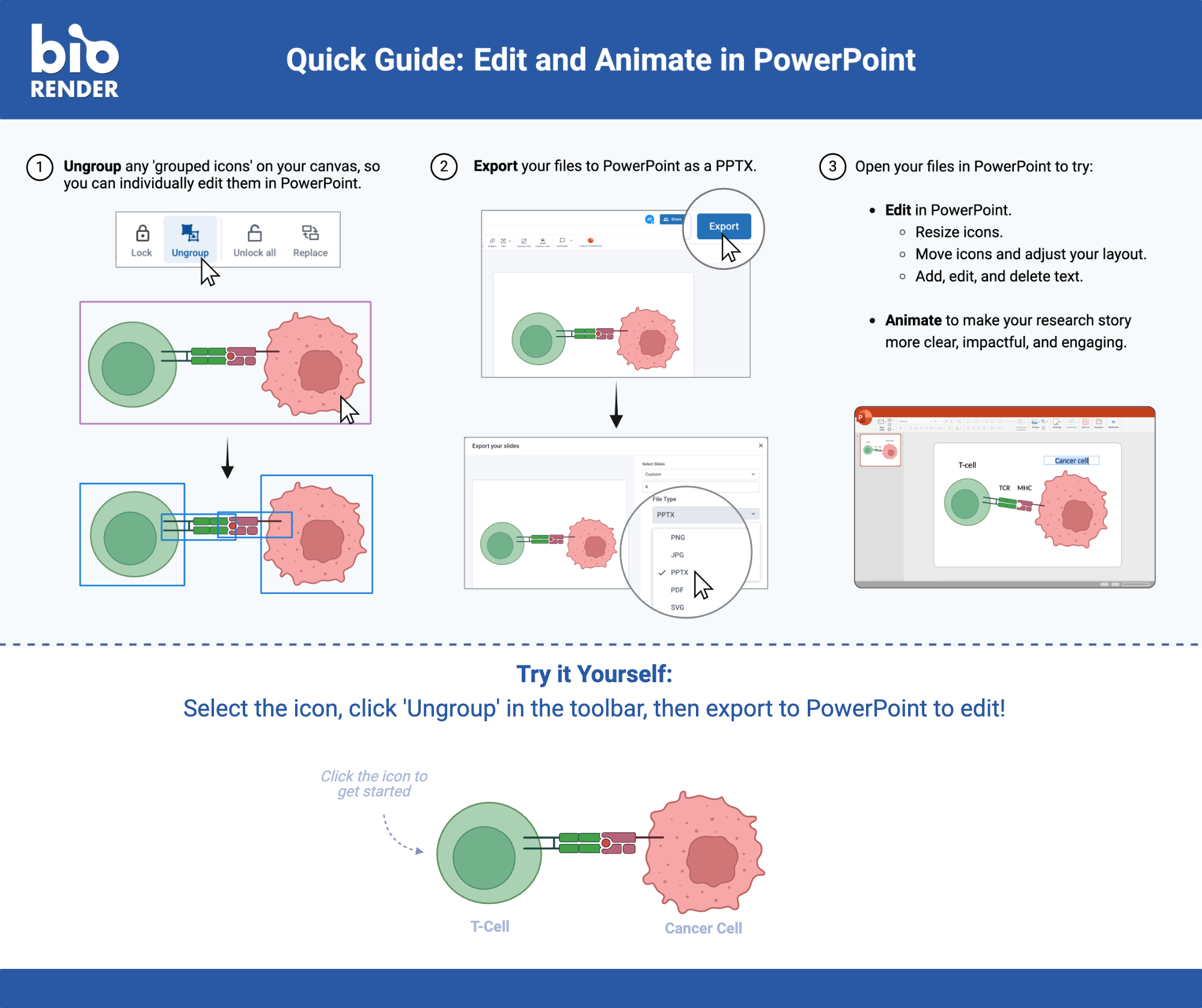
Description: This template is a BioRender quick guide showing how to ungroup icons on the canvas, export the file as a PPTX, and then open it in PowerPoint to resize, move, and edit elements or add animation, using a T-cell and cancer cell icon pair as the working example. It ends with a "try it yourself" prompt inviting the user to ungroup and export their own icon.

Ce n'est pas tout à fait le bon modèle ? Découvrez-en plus.

Recherchez parmi des milliers de modèles dans plus de 30 domaines des sciences de la vie.

search icon
arrow-right

Essayez un synonyme ou inscrivez-vous pour suggérer un modèle depuis l'application.

FAQ sur les modèles BioRender

What does the Quick Guide: Edit and Animate in PowerPoint template show?

This template is a BioRender quick guide showing how to ungroup icons on the canvas, export the file as a PPTX, and then open it in PowerPoint to resize, move, and edit elements or add animation, using a T-cell and cancer cell icon pair as the working example. It ends with a "try it yourself" prompt inviting the user to ungroup and export their own icon.

Is the Quick Guide: Edit and Animate in PowerPoint template free to use?

Yes, you can customize this template with a free BioRender account (no credit card required). Paid plans unlock additional export formats, higher-resolution downloads, and publication permissions.

Can I edit or customize this template?

Yes, every element is fully editable. Icons, labels, colors, arrows, shapes and layout can all be changed to match your preferences or needs using BioRender's drag-and-drop editor. You can add or remove elements to fully customize your use case.

Is this template accepted for use in journals, theses, or grant applications?

Yes, BioRender icons and templates meet journal, grant, and copyright standards for publication, and many researchers cite BioRender directly in their figure legends.

How do I cite BioRender if I use this template?

Unlock publication permissions with a paid plan, and include 'Created with BioRender.com' in your figure legend, or cite BioRender directly per your journal's guidelines.

What is Quick Guide: Edit and Animate in PowerPoint used for / who typically uses this template?

Researchers and scientists use this template for publications, funding proposals, grant applications, presentations, posters, and more.

Prêt à vous lancer ?

Créez dès aujourd'hui des illustrations scientifiques professionnelles
antibody elements3D Phospholipid illustration