Spend less time formatting your scientific poster and more time on your science
Pick a scientific poster template, add your figures, and drag a margin to watch every panel resize and realign on its own. Poster Builder is built by scientists for scientists.
Spend less time formatting your scientific poster and more time on your science
Pick a scientific poster template, add your figures, and drag a margin to watch every panel resize and realign on its own. Poster Builder is built by scientists for scientists.
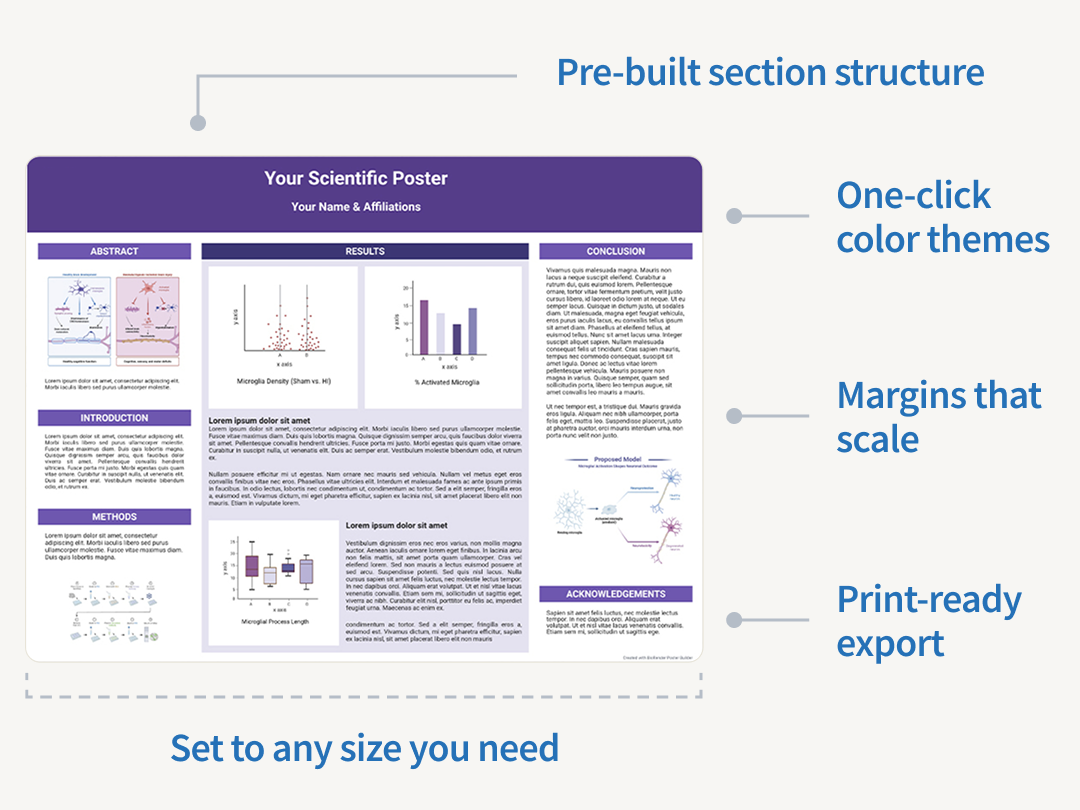
Customizable templates for conferences presentations and scientific research posters
Choose landscape, portrait, or square conference poster templates with font sizes and margins already set for printed posters. Change the color theme to match your institution, or search for templates made for specific universities and conferences.
From blank canvas to printable file in minutes

Set your size
Start from a landscape, portrait, or square template. If your conference gave you a board size, type the width and height in inches in the Settings panel. Posters can be up to 96 inches tall.

Bring in your science
Add BioRender figures, upload your own images and icons, and pull 3D models from the Protein Data Bank (PDB). Boxes resize and line up on their own, so you're not nudging rectangles at midnight.

Finalize, export and print
Never email posters back and forth again. Share with collaborators for commenting and feedback directly in the tool. Then, export as a PNG, JPG, or PDF, at up to 300 DPI. Most print shops ask for 300.
Fill your poster panels faster with AI built for scientists
Describe your methods and get an editable protocol diagram for your Methods panel, or turn your study design into a timeline you can keep refining. Every protocol and timeline draft is built from BioRender's library of scientifically vetted icons, so you edit accurate components instead of re-prompting.
A day, not a week
"Using Poster Builder is a really, really nice experience—it only took me a day to put together a poster. The same poster would probably take me a week to do in PowerPoint.”

Lee S. Cantrell
PhD candidate, Vanderbilt University
Business/Institution

Your figures, poster, and presentations in one place
Build your figures in BioRender, add them to your poster in a few clicks, and bring the same figures into your next presentation without uploading anything twice. Your co-authors can comment and edit in the same file, so your whole project stays in one place from your first conference to your next grant.

Publications
Build journal-ready figures. License for publication or commercial use with one click.

Presentations
Turn your figures into slides. Export to PPT or use BioRender's presentation templates.

Graphing
Import data from anywhere to build publication-quality charts, plots, and graphs.

Grant Applications
Create NIH and NSF-ready figures and graphs that score well before reviewers even reach the methods section.

Protocols
Ensure accuracy and streamline knowledge transfer with visual step-by-step experimental workflows.

Graphical Abstracts
Summarize your paper in a single visual that journals increasingly require for online discoverability.
Frequently asked questions
Does BioRender export in sizes and formats required by conferences and print shops?
Yes. The free plan exports at 72 dots per inch (DPI). Paid plans export at 72, 150, or 300 DPI, and most print shops ask for 300.
I usually make posters in PowerPoint. Why switch?
PowerPoint has no poster-specific layout tools, so you spend your time resizing and aligning text boxes by hand. The Poster Builder handles the layout, keeps your margins consistent, and lets you pull in scientifically accurate figures without leaving the file.
How big should a scientific poster be?
Use the board size your conference gives you, because that is the only size that matters on the day. In Poster Builder you type the width and height in inches in the Settings panel, and posters can be up to 96 inches tall. Common US sizes are 48 by 36 inches and 42 by 36 inches. If your conference asks for A0, type 46.8 by 33.1 inches. For A1, type 33.1 by 23.4 inches.
What resolution do I need to print a poster?
Most print shops ask for 300 dots per inch (DPI). The free plan exports at 72 DPI, which is fine for sharing on screen. Paid plans export at 72, 150, or 300 DPI.
Can I make a poster for free?
Yes. A free account includes 3 figures, 1 graphing file, artificial intelligence (AI) credits, expert-designed templates, image and icon upload, and 3D models from the Protein Data Bank (PDB). Free accounts are for personal and educational use, not for commercial use or publication.
What file formats can I export?
With the free account you can export 72 DPI PNG & JPG. With the paid account you can export 72, 150, or 300 DPI PNG, JPG , and PDF.
Does a scientific poster need an abstract?
Usually yes, though it depends on the conference. Check the submission guidelines. Most poster templates include an abstract section in the top-left, where readers look first.
Can I add my own graphs and images?
Yes, you can import graphs, upload your own images and icons, and pull in any BioRender figure you've already made.
Is my research data secure in BioRender?
Yes. BioRender protects your posters, figures, and uploaded images with the same security and privacy standards that apply to all data in our systems. Our platform is compliant with SOC 2 Type 2 and SOC 3 requirements, and you can review the details in the BioRender Trust Center.
Pick a template and start your poster
Set your size, add your figures, and export a PDF when you are done. You can invite your co-authors at any point.